Numbers in Braille
Numbers in Braille from 0 to 9, with the number sign explained and a translator. See how dates, prices and quantities are written in Braille.
How numbers work in Braille
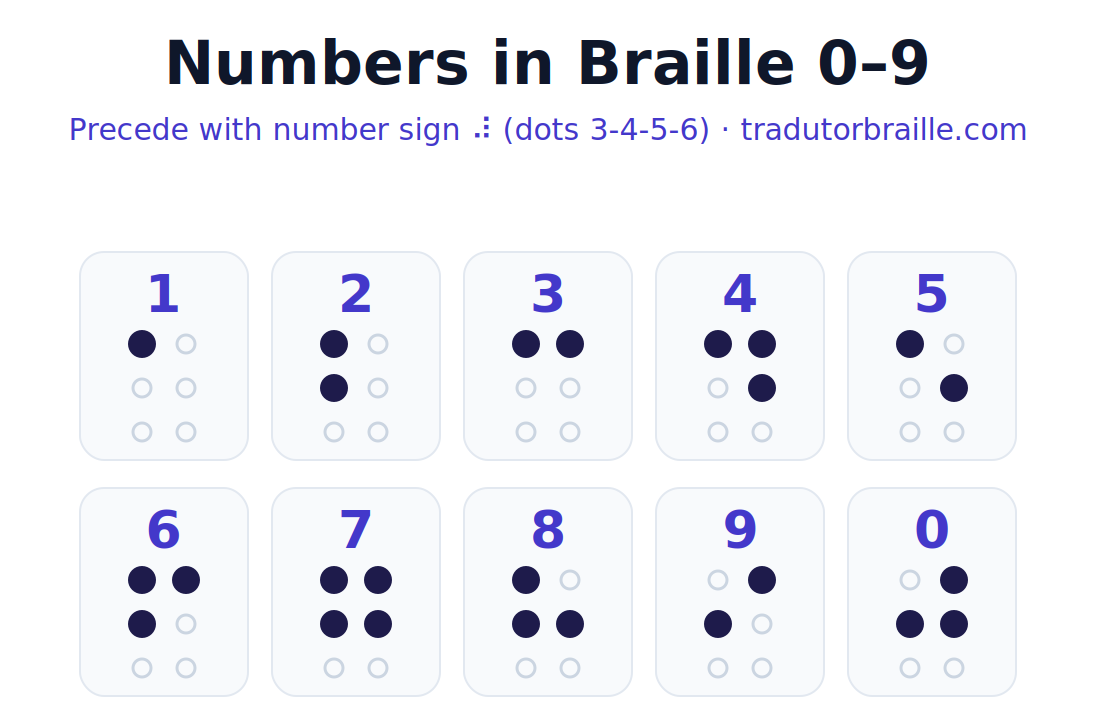
Numbers in Braille reuse the first ten letters of the alphabet. To show that the cells mean digits and not letters, a special number sign (⠼) is placed in front of them.
After the number sign, the cells for a–j stand for the digits 1, 2, 3, 4, 5, 6, 7, 8, 9 and 0. The sign applies to the digits that follow until a space or a letter resets it, so a multi-digit number needs the number sign only once.
Because digits reuse the first ten letters, the number sign is what removes the ambiguity: without it, the same cells would read as letters. The translator places it for you automatically, so you can simply type figures as normal.
Why Braille reuses letters for numbers
At first it seems strange that Braille does not have ten brand-new shapes for the digits. Instead, the first ten letters of the alphabet do double duty as the numbers. Understanding why makes the whole system click.
With only six dots to work with, the number of compact, easy-to-feel patterns is limited, so the inventors reused the simplest shapes rather than inventing harder ones. The catch is obvious: how does a reader know whether a cell means the letter b or the number two? The answer is the number sign. Placed in front, it announces that the cells which follow are figures, and that meaning holds until a space or a letter ends it. This small, elegant rule is what lets the same shapes serve two purposes without confusion. The translator adds and tracks the number sign automatically, so you can type figures naturally and trust that they will read as numbers, not letters.
Braille numbers 0–9
Each digit below already includes the number sign. Type any number in the tool to see it rendered live.
Numbers in Braille
Dates, prices and large numbers
For a number like 2026, the number sign appears once and is followed by the four digit cells. Prices, years and quantities follow the same rule. A decimal point or comma is written with its own punctuation cell between the digits.
When letters follow digits without a space (for example a unit), a special separator is sometimes used; in everyday text, a space is enough to switch back to letters.
Numbers in everyday life
Once the number sign makes sense, everyday figures follow naturally:
- A year like 2026: the number sign once, then four digit cells.
- A price such as 19.99: the number sign, the digits, and a punctuation cell for the decimal point.
- A time like 8 30: type the hour, a space, and the minutes; the space keeps the groups clear.
- A phone number: enter the digits and let the tool render the cells; spaces or hyphens are preserved.
Type any of these above to see the cells, and combine them with words using the text to Braille translator. The alphabet page covers the letters that pair with them.
Numbers in Braille examples
| Text | In Braille |
|---|---|
| 7 | ⠼⠛ |
| 2026 | ⠼⠃⠚⠃⠋ |
| 100 | ⠼⠁⠚⠚ |
| 3.14 | ⠼⠉⠲⠼⠁⠙ |
| 12 30 | ⠼⠁⠃ ⠼⠉⠚ |
Each example uses the standard Braille alphabet, with the capital sign (⠠) and number sign (⠼) applied when needed.
Tips and more
Numbers pair naturally with the Braille alphabet. To convert any mix of words and figures, use the text to Braille translator.
Frequently asked questions
How are numbers written in Braille?
With the number sign (⠼) first, then the cells for a–j standing for 1–0.
Do I repeat the number sign for each digit?
No. One number sign covers all the digits that follow until a space or letter.
How is zero written?
Zero uses the cell for the letter j, after the number sign.
How do I write a year like 2026?
Number sign once, then the digit cells for 2, 0, 2, 6.
Can I convert numbers with the tool?
Yes. Type any digits and the Braille appears instantly.
Related tools
Numbers in Braille from 1 to 100
Every number in Braille starts with the number sign ⠼ (dots 3-4-5-6). After it, the digits 1–9 and 0 reuse the cells for the letters a–j. The sign is written once and stays in effect for the whole number, so 100 is ⠼⠁⠚⠚.
⠼⠁ 1 | ⠼⠃ 2 | ⠼⠉ 3 | ⠼⠙ 4 | ⠼⠑ 5 | ⠼⠋ 6 | ⠼⠛ 7 | ⠼⠓ 8 | ⠼⠊ 9 | ⠼⠁⠚ 10 |
⠼⠁⠁ 11 | ⠼⠁⠃ 12 | ⠼⠁⠉ 13 | ⠼⠁⠙ 14 | ⠼⠁⠑ 15 | ⠼⠁⠋ 16 | ⠼⠁⠛ 17 | ⠼⠁⠓ 18 | ⠼⠁⠊ 19 | ⠼⠃⠚ 20 |
⠼⠃⠁ 21 | ⠼⠃⠃ 22 | ⠼⠃⠉ 23 | ⠼⠃⠙ 24 | ⠼⠃⠑ 25 | ⠼⠃⠋ 26 | ⠼⠃⠛ 27 | ⠼⠃⠓ 28 | ⠼⠃⠊ 29 | ⠼⠉⠚ 30 |
⠼⠉⠁ 31 | ⠼⠉⠃ 32 | ⠼⠉⠉ 33 | ⠼⠉⠙ 34 | ⠼⠉⠑ 35 | ⠼⠉⠋ 36 | ⠼⠉⠛ 37 | ⠼⠉⠓ 38 | ⠼⠉⠊ 39 | ⠼⠙⠚ 40 |
⠼⠙⠁ 41 | ⠼⠙⠃ 42 | ⠼⠙⠉ 43 | ⠼⠙⠙ 44 | ⠼⠙⠑ 45 | ⠼⠙⠋ 46 | ⠼⠙⠛ 47 | ⠼⠙⠓ 48 | ⠼⠙⠊ 49 | ⠼⠑⠚ 50 |
⠼⠑⠁ 51 | ⠼⠑⠃ 52 | ⠼⠑⠉ 53 | ⠼⠑⠙ 54 | ⠼⠑⠑ 55 | ⠼⠑⠋ 56 | ⠼⠑⠛ 57 | ⠼⠑⠓ 58 | ⠼⠑⠊ 59 | ⠼⠋⠚ 60 |
⠼⠋⠁ 61 | ⠼⠋⠃ 62 | ⠼⠋⠉ 63 | ⠼⠋⠙ 64 | ⠼⠋⠑ 65 | ⠼⠋⠋ 66 | ⠼⠋⠛ 67 | ⠼⠋⠓ 68 | ⠼⠋⠊ 69 | ⠼⠛⠚ 70 |
⠼⠛⠁ 71 | ⠼⠛⠃ 72 | ⠼⠛⠉ 73 | ⠼⠛⠙ 74 | ⠼⠛⠑ 75 | ⠼⠛⠋ 76 | ⠼⠛⠛ 77 | ⠼⠛⠓ 78 | ⠼⠛⠊ 79 | ⠼⠓⠚ 80 |
⠼⠓⠁ 81 | ⠼⠓⠃ 82 | ⠼⠓⠉ 83 | ⠼⠓⠙ 84 | ⠼⠓⠑ 85 | ⠼⠓⠋ 86 | ⠼⠓⠛ 87 | ⠼⠓⠓ 88 | ⠼⠓⠊ 89 | ⠼⠊⠚ 90 |
⠼⠊⠁ 91 | ⠼⠊⠃ 92 | ⠼⠊⠉ 93 | ⠼⠊⠙ 94 | ⠼⠊⠑ 95 | ⠼⠊⠋ 96 | ⠼⠊⠛ 97 | ⠼⠊⠓ 98 | ⠼⠊⠊ 99 | ⠼⠁⠚⠚ 100 |
Dates, prices, phone numbers and ordinals
- Date (28/08/2026): ⠼⠃⠓⠲⠼⠚⠓⠲⠼⠃⠚⠃⠋ — each group keeps its own number sign after a separator.
- Price ($19.90): ⠈⠎⠼⠁⠊⠲⠼⠊⠚ — the currency sign, then the number.
- Phone (555-0134): ⠼⠑⠑⠑⠤⠼⠚⠁⠉⠙ — the hyphen restarts the number sign.
- Ordinal (1st): write ⠼⠁ then the letters ⠎⠞ (st).
Decimals, fractions and percentages
- Decimal (3.14): ⠼⠉⠲⠁⠙ — the decimal point is dots 2-5-6.
- Fraction (1/2): the numerator in the normal position, the denominator in the lower cells.
- Percent (50%): ⠼⠑⠚⠚⠴ — number then the percent sign.
Want the letters too? See the Braille alphabet A–Z and the full printable Braille chart.